


 Reply With Quote
New router?
I'm no expert, but they do go bad with age. Over the years I've spent a huge amount of time trying to fix router issues that were easily solved by replacing the sucker for $40 or $50. They gotten faster, N has replaced G, (even if the laptop is still G) and it might be worth considering replacing it, especially if its not supported anymore.
Anyway, to get into your router settings you have to have the password that you used to set it up originally. It's usually "admin" or blank.
You can get a 150mbps router for $19.99
http://www.newegg.com/Product/Produc...tem=33-704-037
Welcome guest, is this your first visit? Click the "Create Account" button now to join.


Results 1 to 11 of 11
-
03-02-2013, 08:01 PM #1
 thickly settled
- Join Date
- May 2008
- Location
- northern Virginia
- Posts
- 5,897
IT question -- wireless router troubles
To disable ads, please log-in.
I recently set up a wireless router in my small condo. It is an old 802.11g router (54mbps) that I bought years ago and, long story short, wound up not using because I didn't really need it. Back then I had a desktop pc, and when I got a laptop I never really needed to move around with it so it was connected to the modem via ethernet cable. But for several reasons recently I decided it would be useful to have a router. I set it up last weekend.
The router appears to work fine. The laptop and my smartphone can detect the network and connect to it. Signal strength appears to be good. However the internet connection with my laptop is now very slow and I frequently get a "Firefox cannot connect to the server" message for just about every website I try to connect to (including this one). I have to keep refreshing until I can finally see the page.
I have no idea what do to do to fix this, and internet research is not giving me the answer. I'm hoping someone here can provide some insight please please please.
The router is set up a few feet away from where I usually sit with the laptop, in the same room.
The laptop is several years old; I bought it about a month before Windows 7 came out and it still runs Vista. The specs that I saved from the packaging say "WLAN 802.11bg."
From what I've read, if I got an N router, it would still run at G speed with the laptop.
The other things I would connect to the network are:
- my smartphone, if I'm having problems with the 4G connection. It supports 802.11bgn.
- an HP printer that has wireless capabilities, though currently I connect it to the laptop via USB cable. The manual is copyright 2009 so it's about 3 years old. It just says "802.11" and does not specify G or N.
- my mother's Kindle, when she visits.
I'm not into gaming. I don't download things like movies or TV shows from the internet much, though I do so occasionally (usually a bike race or college football/basketball game or the occasional Foo Fighters live-via-internet performance ).
).
I'm wondering if maybe the problem is that the wireless thing in the laptop is 802.11bg. I'm not planning to buy a new laptop anytime soon, but can I upgrade the wireless thing to 802.11n for a reasonable cost?
Someone at work suggested there might be a problem with the router settings, but I have no idea how to tell if that's the case. I was pretty much guessing when I set it up. Since it's such an old router, I can find it on the manufacturer's website but there's a notice that they no longer support it. I thought about trying to upgrade the firmware (the last upgrade was from 2007), but then I would have to go through the setup all over again and I don't want to waste the time if the basic problem is the 802.11bg wireless thing in the laptop.
So, does anyone have any ideas? Thank you thank you thank you in advance!!!
- Gray 2010 carbon WSD road bike, Rivet Independence saddle
- Red hardtail 26" aluminum mountain bike, Bontrager Evoke WSD saddle
- Royal blue 2018 aluminum gravel bike, Rivet Pearl saddle
Gone but not forgotten:
- Silver 2003 aluminum road bike
- Two awesome worn out Juliana saddles
-
03-02-2013, 08:43 PM #2
Don't worry, be happy!
- Join Date
- Nov 2002
- Location
- the dry side
- Posts
- 4,365
IT question -- wireless router troubles
Last edited by Irulan; 03-03-2013 at 06:22 AM.
2015 Liv Intrigue 2
Pro Mongoose Titanium Singlespeed
2012 Trek Madone 4.6 Compact SRAM
-
03-03-2013, 09:09 AM #3
like food and cycling
- Join Date
- Mar 2007
- Location
- Troutdale, OR
- Posts
- 2,600
Can you connect to your router from your PC? They usually default to 192.168.1.1 Belken brand does and so do several others. (Where you normally type the web address such as forums.teamestrogen.com, you type in 192.168.1.1). If the WiFi router doesn't respond see what the instruction says. If its the same as 192.168.1.1 then the WiFi router has gone bad.
And did you follow the instruction on how the ethernet cables are supposed to be connected?
Connection should be:
DSL/ 3G/4G modem to the modem port of your WiFi router. Anything you still want connected via cable to the router should then be connected to the switch side of the router. Usually you will have 4 maybe 5 of these. The modem port is usually colored differently than the other 4 or 5.
Oh... If you still have your previous router connected, this may be the reason for the conflict.
And yes routers go bad fairly often. Agree with Irulan. Newegg probably has the best price. TigersDirect is another but I rarely order from them because Newegg has what I want.
-
03-03-2013, 09:49 AM #4
In-app purchases
- Join Date
- Sep 2007
- Location
- Uncanny Valley
- Posts
- 14,498
You mean WPA2?
If the last firmware update was six years ago I'd replace it too. Devices and protocols evolve together.Speed comes from what you put behind you. - Judi Ketteler
-
03-03-2013, 10:39 AM #5
thickly settled
- Join Date
- May 2008
- Location
- northern Virginia
- Posts
- 5,897
Okay, I'm a little confused by this. I'm software developer but I know close to nothing about hardware. Originally Posted by Muirenn

The laptop is WLAN. I can see that on the specs that I saved from the original packaging.
I don't see WLAN anywhere in the router specs. When I set up the router I had a choice of WEP encryption or WPA-PSK. I chose WPA-PSK.
I have a friend on facebook who had me run several commands in the CMD window.
1. First I pinged google.com 1200 times. Results were:
Packets: Sent: 1200, Received: 1160, Lost: 40 (3%)
Approx. round trip times in milliseconds: min. 20 max. 153 avg 26.
I saw some "Request timed out" messages and some "General Failure" messages. There was no pattern -- there would be anywhere from 9 to almost 100 successful packets sent in between timeout/failure messages.
2. Then I did "tracert google.com" 3 times. The first time I got General Failure after the second hop. The second time I got a request timeout (8th hop) but it did finish in 12. The third time it finished in 11. (My friend said I should see < 30 hops between my laptop and google.)
3. Then I did ipconfig and saw this. My friend hasn't answered yet but based on the wording of his questions to me it appears that a blank DNS suffix is a problem.
Wireless LAN adapter wireless network connection
Connection specific DNS suffix: [blank]
Link-local IPv6 address: [string of letters, numbers and colons]
IPv4 address: [looks like a normal IP address type thing]
subnet mask: [looks like a normal IP address type thing]
default gateway: [looks like a normal IP address type thing]
This is all very interesting (which I guess means I'm a nerd!). Thanks very much for your answers. I am interested in hearing what my fb friend has to say, since it's quite possible that I configured the router wrong. I will definitely be getting a new one anyway, but it would certainly be good to know the right way to configure that one so I don't run into this problem again.
Interesting that no one is indicating that the 802.11bg wireless thing in the laptop is out of date and should be updated. I would get an N router when I get a new one, but it would be held back by the laptop.
- Gray 2010 carbon WSD road bike, Rivet Independence saddle
- Red hardtail 26" aluminum mountain bike, Bontrager Evoke WSD saddle
- Royal blue 2018 aluminum gravel bike, Rivet Pearl saddle
Gone but not forgotten:
- Silver 2003 aluminum road bike
- Two awesome worn out Juliana saddles
-
03-03-2013, 10:43 AM #6
Registered User
- Join Date
- Feb 2006
- Location
- DE
- Posts
- 1,210
My old router works with my old computer and Kindle, and my new computer, but not with my sister's nor with my niece's computer. It would not work with my new Kindle Fire. After many lengthy phone calls with Amazon and Verizon, Verizon sent me a new router, which seems to work with everything.... except for the old computer
I have the old computer one set up in the sewing room upstairs thinking I could stream movies when I'm working up there but no luck. I am going to try having both routers set up - one up and one downstairs to see it that will work, but I have a feeling it will only cause confusion among all of my devices and have not got around to it just yet. If someone already knows this is a good, or a bad, idea, please let me know!
-
03-03-2013, 10:59 AM #7
thickly settled
- Join Date
- May 2008
- Location
- northern Virginia
- Posts
- 5,897
Clearly I am a newbie with this stuff, but I found this website last night and it seems pretty good. There's something about setting up an access point with an old (slower) router along with a new (faster) router that might be relevant to your problem. Originally Posted by withm
http://www.smallnetbuilder.com/wireless/wireless-basics
- Gray 2010 carbon WSD road bike, Rivet Independence saddle
- Red hardtail 26" aluminum mountain bike, Bontrager Evoke WSD saddle
- Royal blue 2018 aluminum gravel bike, Rivet Pearl saddle
Gone but not forgotten:
- Silver 2003 aluminum road bike
- Two awesome worn out Juliana saddles
-
03-06-2013, 08:02 AM #8
thickly settled
- Join Date
- May 2008
- Location
- northern Virginia
- Posts
- 5,897
I did order a new router from Amazon. In the meantime I hardwired the laptop to the router, which seems to give a more stable connection. I'm working from home today due to the Snowquester so I need my internet connection to be stable.
I also looked into getting a USB wireless N adapter for my laptop, but decided to wait and see if the new router will be fast enough with the G wireless card that's in the laptop already. No point in spending money until I know it's worthwhile.
Thanks again for all the replies. Not only does it help me with my current problem, but since I am the "computer expert" for several family members it will also help me deal with problems they ask about in the future.
- Gray 2010 carbon WSD road bike, Rivet Independence saddle
- Red hardtail 26" aluminum mountain bike, Bontrager Evoke WSD saddle
- Royal blue 2018 aluminum gravel bike, Rivet Pearl saddle
Gone but not forgotten:
- Silver 2003 aluminum road bike
- Two awesome worn out Juliana saddles
-
03-06-2013, 08:19 AM #9
Don't worry, be happy!
- Join Date
- Nov 2002
- Location
- the dry side
- Posts
- 4,365
Originally Posted by ny biker
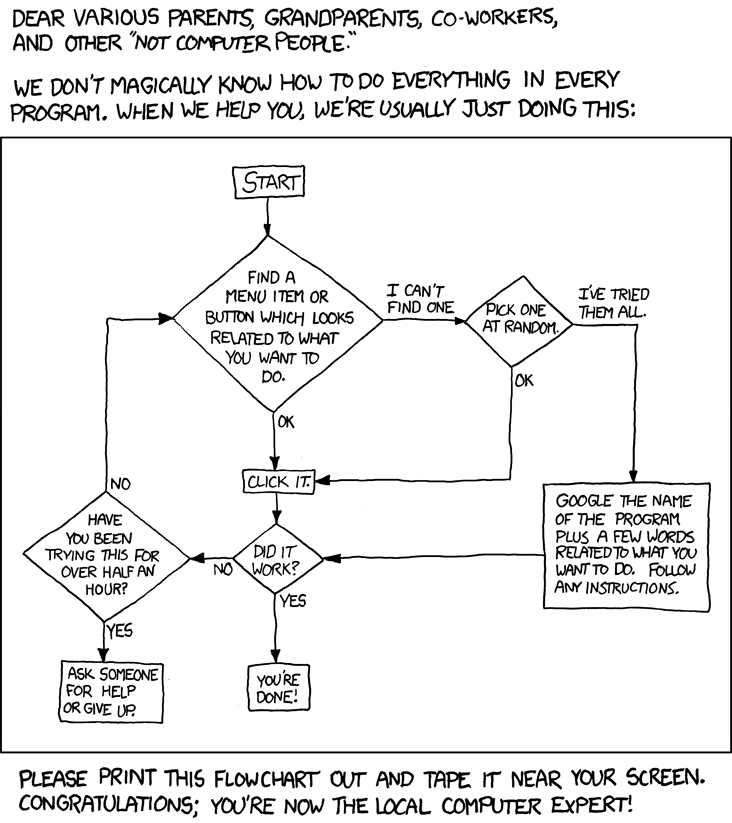
You'll appreciate this, then. My son sent it to me, and author allows hotlinks
 2015 Liv Intrigue 2
Pro Mongoose Titanium Singlespeed
2012 Trek Madone 4.6 Compact SRAM
-
03-06-2013, 08:43 AM #10
thickly settled
- Join Date
- May 2008
- Location
- northern Virginia
- Posts
- 5,897
THIS IS SO TRUE!!
It's amazing what you can accomplish with a little patience and a good search engine.
- Gray 2010 carbon WSD road bike, Rivet Independence saddle
- Red hardtail 26" aluminum mountain bike, Bontrager Evoke WSD saddle
- Royal blue 2018 aluminum gravel bike, Rivet Pearl saddle
Gone but not forgotten:
- Silver 2003 aluminum road bike
- Two awesome worn out Juliana saddles
-
03-13-2013, 12:34 PM #11
thickly settled
- Join Date
- May 2008
- Location
- northern Virginia
- Posts
- 5,897
So, just to follow up, I installed the Linksys E3200 router yesterday. It seems to be working well so far and is definitely faster than the old router, which I will take to the county's electronics recycling dropoff site.
One reason I chose this router is that is is supposed to be easy to set up, and I think it was. However there are two issues -- the Cisco Connect software was not installed on my pc during the set up process, and there is a "guest network" (access to wifi but no access to files on my laptop) that I cannot log into with my smartphone. I tried to get help via an online chat with Linksys tech support and it was a disaster. The person seemed to have less knowledge than I do, didn't listen to what I was asking and was so unresponsive I had to keep asking if anyone was still on the line. Finally I gave up and said it was late and I needed to go to bed so I would have to try again to fix the problems another time. After several minutes with no answer, I disconnected the session. Then today their system emailed me a transcript -- after I disconnected the person came on and said well you seem to be gone so I guess I solved your problem. Holy cow, I was stunned by the incompetence. Apparently I am on my own in trying to to solve these problems.
But at least the connection with the regular non-guest network is fast...
- Gray 2010 carbon WSD road bike, Rivet Independence saddle
- Red hardtail 26" aluminum mountain bike, Bontrager Evoke WSD saddle
- Royal blue 2018 aluminum gravel bike, Rivet Pearl saddle
Gone but not forgotten:
- Silver 2003 aluminum road bike
- Two awesome worn out Juliana saddles


 Sorry, I'm not an IT. If anyone has anything to add to this. It certainly worked. Anyway, check your protocol, and have them try a different one. Sounds like exactly what worked with mine.
