

I do the same 9 mile hill ride over and over, and I have been trying to find a good way to measure improvement (or its opposite, but let's think positively here!: p )
Overall time on the ride is not that helpful, because the first 2 and last 2 miles are nothing but downhill, and sometimes I can really cruise, and sometimes there's traffic or construction. The middle 5 miles of the route is just a steady couple of climbs, but I always forget to hit the lap button at the beginning of the main climb and again at the end. I can mess around in the HRM software, selecting portions of the ride and looking at the pop-up selection info, to do a virtual lap measurement, but it is ultimately not very useful.
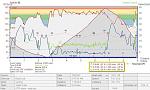
Recently I started paying attention to a summary statistic I hadn't really noticed before: Total time (and percent time) spent climbing, flat and descending. I never really got how useful this info could be on a repeated training route like this, since all the "work" for me happens on this ride in the climbing part,and that's the activity that is the best indicator of how my fitness might be improving. Also, nothing ever happens on the climb that would cause me to go slower than I could (traffic, etc.) - it's just just heat, and how pokey or strong I feel.
So what I haven't figured out yet is how Polar determines what is climbing and what is flat, because this route only has about 200 yards of actual "flat" road, so they must consider a range of grade percents as "flat".
Any other Polar users have any idea about this? Am I missing anything about how I should or shouldn't be using this data?
Here's a screen shot of one ride this week - the summary data I'm talking about is highlighted in yellow.
Welcome guest, is this your first visit? Click the "Create Account" button now to join.


Results 1 to 12 of 12
Thread: Polar HRM software (SK? V?)
Hybrid View
-
07-06-2007, 05:12 PM #1
 Seven!
- Join Date
- May 2005
- Location
- Bay Area, CA
- Posts
- 1,351
Polar HRM software (SK? V?)
Last edited by bikerz; 07-06-2007 at 05:19 PM.
Keep calm and carry on...
-
07-06-2007, 05:48 PM #2
Inner Geekette
- Join Date
- Aug 2003
- Location
- Bendemonium
- Posts
- 9,673
I don't know how Polar decides what is climb or ascent either.
I guess the only way I would do it is perhaps what you've already mentioned. I'd insert 2 lap markers at the same point on every file and isolate the info for what would now be "Lap 2". Lap 1 and 3 being the portions that can be affected by traffic, etc. It appears that you have automatic lap markers appearing or a lot of lap markers already so I'd get rid of all those first.
I just ride without worrying about hitting the lap button any longer so when I download the file there is only one lap and I can create lap markers where I should have hit the lap button if I had the discipline and brains. On your route, I'd insert them about mile 2.75 and 6.75 on all your files.
I think you can copy this section to another file, do it again with another ride, and then create a comparison where the graphs will set atop each other.
I haven't played with the reports. What about those?
OK, now I'm going to have to go turn on the home computer and see what it does. I rarely track heart rate so the only comparison I'd have is speed, but you could compare heart rate also. Not sure that this is the time of year when I really want to be looking at these stats. Strong legs but barfo on the heat (like that medical term?).Frends know gud humors when dey is hear it. ~ Da Crockydiles of ZZE.
-
07-06-2007, 05:50 PM #3
Inner Geekette
- Join Date
- Aug 2003
- Location
- Bendemonium
- Posts
- 9,673
PS - I've never really gotten serious about finding a Polar users group. Is there one?
Frends know gud humors when dey is hear it. ~ Da Crockydiles of ZZE.
-
07-06-2007, 06:06 PM #4
Inner Geekette
- Join Date
- Aug 2003
- Location
- Bendemonium
- Posts
- 9,673
Another thought for you the computer geek, err, goddess.
 Export the files, isolate the date for the section you want and write some comparison program.
I think a few people over on bikejournal do this. Maybe ask your question there.Frends know gud humors when dey is hear it. ~ Da Crockydiles of ZZE.
-
07-08-2007, 09:10 AM #5
Seven!
- Join Date
- May 2005
- Location
- Bay Area, CA
- Posts
- 1,351
SK - thanks for all your thoughts!
I know it won't surprise you to learn that I actually thought about this Originally Posted by SadieKate

 , but I haven't quite figured out how to get the data in raw enough form. I'll look into BJ one of these days and check it out.
We're doing 50 flat miles again today, so I won't have much chance to check out the ascent thing - maybe I'll just send an email to Polar and ask about the grade ranges for that summary info.
I can waste so much time messing around with the ride data! Keep calm and carry on...
-
07-08-2007, 02:43 PM #6
Inner Geekette
- Join Date
- Aug 2003
- Location
- Bendemonium
- Posts
- 9,673
You can open the files in Notepad but then you'd still need to get them into a CVS file or something. I bet someone on bikejournal would know how to to do this. The geeks are more openly public over there.
 Frends know gud humors when dey is hear it. ~ Da Crockydiles of ZZE.

 Reply With Quote
 Posting Permissions
Powered by vBulletin® Version 4.2.2
Copyright © 2026 vBulletin Solutions, Inc. All rights reserved.
Copyright © 2026 vBulletin Solutions, Inc. All rights reserved.
All times are GMT -8. The time now is 01:12 AM.
vBulletin Skin By: PurevB.com